
Move Files between Clouds with Multcloud

Moving between Accounts of the Same Cloud Brand

Directly transfer files from one account storage to another of the same cloud service. For instance, copy from one Google Drive account to another.

Learn More

Migrate between Accounts of Different Cloud Services

Migrate files/folders, documents/slides, photos/pictures/images, videos/movies, music, etc. from one cloud provider to another without downloading and re-uploading.

Learn More


Moving Clouds without Losing Data

MultCloud moves your cloud files using 256-bit AES encryption for SSL. It promises not to save your cloud username and password, also not save your data.

Learn More


Google Chrome Extension App

Add MultCloud extension application to your chrome explorer to easily manage your Google cloud movement. Clicking on the little icon on top right of your browser, you can get quick access to MultCloud.

Learn More

Email Notification for Google Syncing

Inform you about the final result of the google cloud sync, no matter succeed or failed. Just setup and start the task, close the page and do your other business; once it finishes, you will receive an email.

Learn More

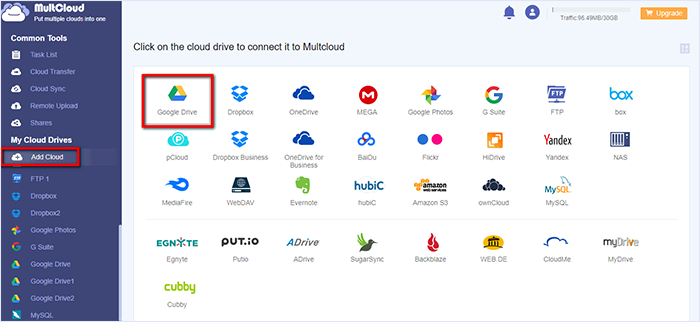
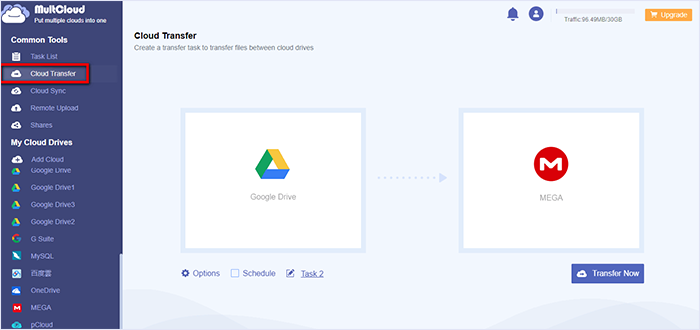
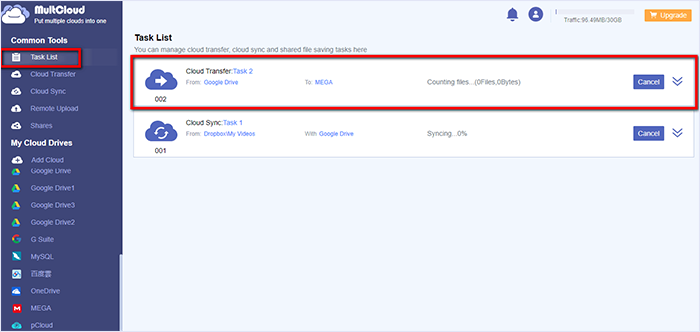
Step-by-step Guides for Moving Clouds

Supported Cloud Drives

MultCloud supports Google Drive, Dropbox, OneDrive, MEGA, etc. all most 30 cloud drives. These clouds are popular and safe cloud storages which gain large number of users all over the world.